
Scrapling is a Python framework that turns web pages into usable data, from a price table to clean text for a support bot. It suits a small business with a technical person and a defined, permitted collection job. The biggest risk is continuing after a website refuses the program: getting past bot checks is one of Scrapling's headline features. Use it for your own pages or clearly permitted data, leave those features out of the job, and stop when the owner says no.
Our Trendshift roundup gave Scrapling a short warning. Here we unpack the useful work as well as the warning. We read the current README, license, documentation, release notes and relevant source on November 3, 2026. We did not install or run Scrapling, test its claims, or collect any business's catalog. The examples below are illustrations.
What web scraping actually means
Web scraping is a program reading web pages and copying the parts you want into a table. Think of a temp worker copying prices into a spreadsheet, only faster. The program still needs instructions about which pages to visit, which price belongs to which item, and when to stop.
Parsing means taking the page apart into recognizable pieces. A price, product name and sale banner may look obvious to you; code needs a rule that locates each piece. Scrapling supports CSS selectors and XPath, two ways to describe a location in a page, rather like giving a worker a shelf number. Its adaptive selection can look for a similar element after the page changes. Similar does not guarantee correct. A sale price could be mistaken for a monthly installment. Fetcher and parser guide.
A fetcher is the part that asks a website for a page and receives its answer. Crawling means following a planned set of links to find more pages. A spider is the program coordinating that walk, applying your parsing rules and collecting the results. Reading a single approved URL is a much smaller assignment than following every link on a supplier's site. Scrapling supports both. Spider templates.
An API is a service's designated way for programs to request data. A feed is a prepared stream or file of updates. Prefer an official API or feed when one exists and permits your purpose. You get a defined data format and a clearer access agreement. Finding an undocumented data address behind a page does not establish that agreement.
Rate limits restrict how often your program may ask for something. One scheduled run each week can still hammer a server if it sends every request at once. Control both the schedule and the spacing within each run. Our proposed settings below use one request at a time with a pause; the site's terms or written agreement may require a longer pause.
robots.txt is a published request from the site owner about which paths programs should visit. RFC 9309, section 1 defines the protocol and says its rules “are not a form of access authorization.” It is a technical standard; following it does not make copying lawful. Follow it alongside the site's terms, permissions and access controls.
What the current Scrapling actually provides
The latest release returned by GitHub was v0.5, published October 17, 2026. Its migration guide matters because older examples describe a browser class that no longer exists.
Scroll to compare columns and rows when the table extends beyond the box.
| Part | What it does | What an owner should know |
|---|---|---|
Fetcher |
Sends ordinary web requests without running page JavaScript | Suits pages whose data arrives in the initial response |
AsyncFetcher |
The same kind of requests, with programming support for waiting on several tasks | More simultaneous work requires an explicit rate limit |
FetcherSession |
Reuses connections, cookies and settings between requests | Configure identity and retries here; keep customer logins out |
StealthyFetcher |
Runs a browser, including JavaScript and page interaction | Includes anti-bot behavior; excluded from our starting setup |
StealthySession, AsyncStealthySession |
Keep that browser running between requests | Browser state can persist across pages |
DynamicFetcher |
An older browser class | Removed in v0.5; it is not a current alternative |
Sources: public fetcher exports, request classes, and v0.5 migration guide.
The current browser uses a modified browser backend called Patchright. The migration guide says the former plain browser backend was removed. Leaving solve_cloudflare=False keeps the explicit Cloudflare solver off; it does not remove the browser's other built-in anti-bot behavior. For this article's starting setup, use ordinary requests with browser imitation disabled, or parse a file the owner supplies. If a permitted job genuinely needs JavaScript, have IT and the site owner agree on the browser method first.
Spiders, including the Shopify template
The base Spider schedules requests, calls your parsing function, filters duplicate work and gathers items. It supports saved progress, streaming results as they arrive, and exports such as CSV, the comma-separated table format spreadsheets can open. Source and advanced guide.
CrawlSpider follows links matching your rules. SitemapSpider starts from a site's published page index. XMLFeedSpider and CSVFeedSpider read prepared feeds. ContentSpider turns pages into Markdown, plain text with simple formatting, and can write one document per page. It requires allowed domains to bound the job. These are templates for a developer to adapt. A template grants no permission to collect every matching page. Template documentation.
ShopifySpider reads the store's public collection data, then its collections' product data, rather than extracting the visible page layout. It produces one item per product variant and removes duplicate variants appearing in multiple collections. Fields include name, price, SKU, product link and description. Its stock field is especially easy to misread: available becomes None, unavailable becomes 0. It does not tell you how many units are on the shelf. The docs also warn that protected stores may not work. Use the merchant's approved API or export first. Platform guide and implementation.
What the AI connection exposes
An MCP server is a small program that hands an AI assistant tools, like a contractor's van carrying equipment for a job. Scrapling's server exposes sixteen tools. They include ordinary requests, browser loading, opening and closing sessions, extracting text, screenshots, page actions, running JavaScript, inspecting recorded network traffic, and saving or restoring browser state. The request tools accept methods that can change data as well as read it; page actions can fill fields and click controls. This is substantial authority to give an assistant. MCP guide and server source.
The README advertises getting past Turnstile checks and model-assisted CAPTCHA handling. Its sponsor section includes residential IP resellers and CAPTCHA-solving services. Those are the project's claims and commercial context; we did not verify their effectiveness. Our recommendation is to leave those capabilities unused. A CAPTCHA, Turnstile check or block is the owner's signal to stop. Having an AI assistant operate the controls does not transfer your responsibility to the model.
The server's content cleaning is also no guarantee that a page cannot mislead an assistant. Treat collected text as evidence to review, never as instructions to change the job. Keep the MCP server out of the first pilot, and do not expose it publicly. Ordinary collection and Markdown conversion do not require an AI model.
Six useful small business jobs
Every business and schedule here is illustrative. Before each job, record the owner, permitted URLs, terms clause or written consent, allowed fields, retention period and stop conditions. All six use the same baseline: obey robots.txt, identify the business honestly, send requests slowly, avoid login areas and exclude personal data. If an official API or feed permits the job, use it first.
The BSD-3-Clause license imposes no software license fee. That is not a hosted service plan. For each illustration below, hosting, setup, maintenance and any third-party data charges are unknown until scoped. None needs a paid AI plan for collection. Treat these as cost boundaries; none is a quote for a finished project.
Your own website after an update. For example, a hardware shop could check its public product pages after publishing changes, then once daily. Collect page status, product identifier, displayed price and the presence of schema, the structured labels that help software recognize a product. Ownership supplies the starting authority; check the hosting agreement and any third-party services too. Use your site export or monitoring API if available. Keep the baseline settings, omit customer accounts, and have a person confirm a mismatch before changing a price. License fee: none; operating and developer cost: unknown. Scrapling supplies collection and parsing, while your developer supplies the error rules.
A supplier catalog with written approval. For example, a regional parts distributor could ask a supplier for permission to collect part number, description, pack size and current trade-independent public price each night. The signed email should identify paths, fields, frequency and whether descriptions may be reused in the distributor's store. Prefer the supplier's CSV feed or API. Keep robots obeyed and the rate at or below the agreement, identify the distributor, and exclude dealer login pages and buyer records. License fee: none; supplier access fees and integration cost: unknown. Recheck units before comparing a box price with an individual-item price.
Your own directory listings. For example, a plumbing company could compare its name, public business telephone, address, opening hours and website across approved directories once a month. Owning the business does not mean owning those directory pages. Each directory's terms or written permission must allow the collection. Prefer an official listing API or the owner's export. The baseline still applies; exclude reviewer names, reviews and staff contact details. Treat a sole proprietor's home address or personal number as a privacy issue and take it out of this pilot. License fee: none; directory API and staff review costs: unknown.
Public government data without an API. For example, a small construction supplier could collect an agency's public tender titles, closing dates and source links weekly when there is no usable official API or feed. Check that agency's terms and reuse rules; public availability alone does not settle every right. Keep the baseline, including robots review, and omit named applicants or personal contact details. Store the observation date and link so a person can check a deadline before acting. License fee: none; preparation cost: unknown. If the agency offers a bulk download later, switch to it.
A competitor's public prices within its terms. For example, a bicycle shop could check a narrow list of comparable products once a week where the site's terms permit that use. Collect product identifier, price, currency, availability label and observation time. Prefer an authorized feed; if permission is unclear, ask before collecting. Apply the baseline and stop at any challenge or refusal. Avoid account-only discounts, personal data, product photos and copied marketing text. License fee: none; implementation cost: unknown. A person should compare sizes, tax treatment and delivery charges before interpreting a lower headline price.
Your own help pages for a support bot. For example, a repair business could refresh a clean-text copy of its public service instructions whenever those pages change. Use its publishing-system export first; otherwise ContentSpider can gather the approved pages. Ownership and cleared contributor rights cover the content, while the baseline excludes customer cases and login areas. Keep the original link, publication context and last checked date with each document. License fee: none; bot hosting and model costs: unknown and separate from collection. Have staff test answers against the original pages before customers see them. Content conversion documentation.
The Computer Fraud and Abuse Act and other legal risks
This section is informational, not legal advice. Most ordinary small business uses are lawful when they stay on your own systems, collect public data within applicable terms and rights, or operate with valid written permission. Ask a lawyer licensed in your state about an uncertain target before collecting. Give that lawyer the terms, proposed fields, method, intended reuse and any communication from the owner.
Public pages and the CFAA
The federal Computer Fraud and Abuse Act, 18 U.S.C. § 1030(a)(2)(C), addresses intentionally accessing a protected computer without authorization or by exceeding authorized access, and thereby obtaining information. Internet-connected business servers commonly fall within the broad definition in subsection (e)(2). The law also addresses damaging conduct in subsection (a)(5), and subsection (g) permits qualifying civil suits. A small collection budget is no exemption.
In Van Buren v. United States, the Supreme Court held in 2021 that improper use of information a person was entitled to obtain did not itself satisfy the exceeding-access branch. Its “gates-up-or-down inquiry” asks whether someone can enter the computer or relevant area. But footnote 8, on slip-opinion page 13, left open whether access limits must be technological or may also arise from contracts or policies. It did not erase contract law.
The Ninth Circuit's April 2022 hiQ v. LinkedIn opinion, pages 35 to 40, distinguished genuinely public pages from areas requiring authorization. It upheld preliminary protection for hiQ while serious questions remained about applying the CFAA to public profile collection. That was a preliminary-injunction appeal, so it settled less than its fame suggests, and it binds only courts in the Ninth Circuit.
A gate or a stop letter changes the facts
A login, paywall, CAPTCHA, Turnstile check, IP block or cease-and-desist letter changes the access picture. Our operating rule is to stop at any of them on someone else's site and seek permission or legal review. Continuing past that clear refusal is where the exposure becomes especially serious. We do not claim every challenge or IP block automatically establishes a CFAA violation.
In Facebook v. Power Ventures, the Ninth Circuit in 2016 found liability for continued access after Facebook revoked permission through a letter, followed by efforts to get around IP barriers. Users' consent did not override Facebook's withdrawal. These were account-protected pages, a distinction hiQ later emphasized. The amended opinion, pages 16 to 19 and footnote 5, also cautions that bypassing an IP address alone, without more, would not establish unauthorized use. A business should not turn that nuance into a plan to keep trying.
Terms can support a separate contract claim
hiQ's later history matters. The Northern District of California's November 4, 2022 order found that hiQ breached LinkedIn's User Agreement through its collection and data use, and through contractors' false accounts, while leaving equitable defenses unresolved. The dispute then settled. Proskauer's report says the court entered the consent judgment and permanent injunction on December 8, 2022. Agreed settlement statements are not new precedential findings. Winning the earlier public-page CFAA argument did not remove the contract problem.
There are limits on contract claims too. In Meta v. Bright Data, January 23, 2024, that district court granted Bright Data summary judgment on Meta's contract claims concerning logged-off public-data collection. The particular terms and record mattered; a tortious-interference claim remained. Pages 35 to 37 are not a general CFAA clearance or permission to disregard a different site's agreement.
Clickwrap asks you to accept terms, usually through an agreement button. Browsewrap asserts that using the site accepts linked terms; notice and assent matter, so a quiet footer link and an accepted account agreement present different facts. Nguyen v. Barnes & Noble, Ninth Circuit, 2014, pages 9 to 16.
Copying, personal information and state laws
Permission to read a page does not necessarily include permission to republish its photographs, descriptions or articles. Copyright's exclusive rights include reproduction and distribution; fair use requires a contextual assessment. Obtain reuse rights for the content your project needs, including the planned use in a support system.
Privacy is another separate check. The California Attorney General's CCPA guidance explains obligations for covered businesses handling Californians' personal information and consumer rights such as deletion and correction. Coverage thresholds and exclusions apply, including defined publicly available information. Neither “every small business is covered” nor “everything visible online is exempt” is a sound shortcut. Keep personal fields out of the pilot and set a retention period.
States have their own computer laws. California Penal Code § 502(c)(2) addresses knowingly accessing and taking, copying or using data without permission. Texas Penal Code § 33.02(a) addresses knowing access without the owner's effective consent. Federal decisions do not settle every state claim, and other countries differ.
Interference with someone else's systems can also invite trespass-to-chattels claims, a civil property claim: hiQ discusses eBay v. Bidder's Edge, N.D. Cal. 2000, and the importance of harm at page 41, footnote 21.
Finally, Scrapling's README disclaimer says “educational and research purposes only.” Its BSD license permits use and redistribution subject to notice and endorsement conditions. Have counsel resolve any concern about those documents for your deployment. Neither grants rights over another site's systems or content, and calling a commercial job research does not excuse crossing a boundary.
The permission checkpoint
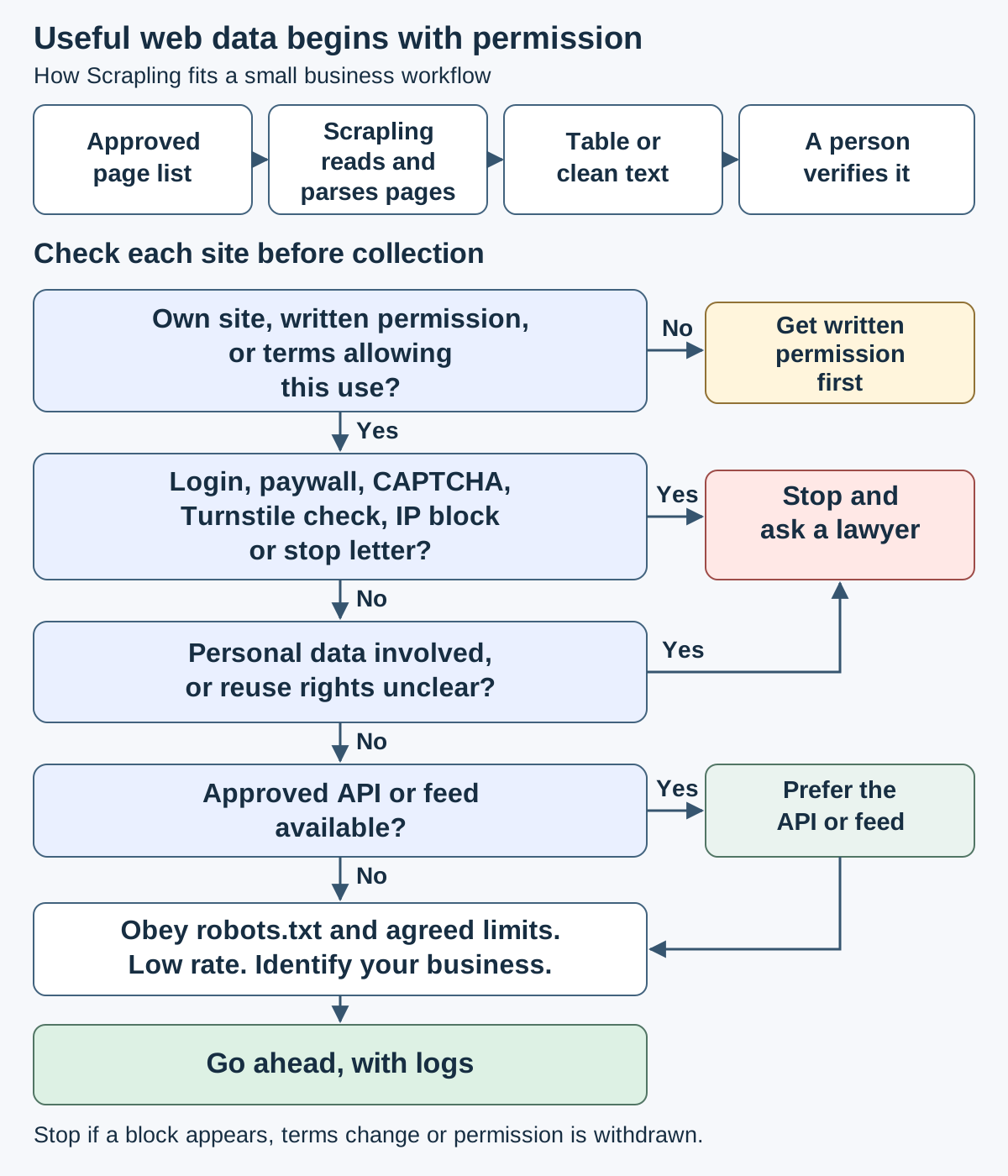
┌────────────────┐
│ Approved pages │ → Read and parse → Table or text → Person checks
└────────────────┘
                         ▼
Own site, written OK or terms permitting this use?
  No → Get written permission first
  Yes ▼
Login, paywall, CAPTCHA, Turnstile, block or stop letter?
  Yes → Stop and ask a lawyer
  No ▼
Personal data or reuse rights unclear?
  Yes → Stop and ask a lawyer
  No ▼
Approved API or feed exists? → Yes → Prefer that route
  No ▼
Obey robots → Low rate → Identify business → Proceed with logs
Before you install
Hand your IT person the completed target record from the kit before asking for code. Include the exact fields, a sample of the desired table, a budget, the person who reviews results and the date permission expires. A pilot should answer a business question you can state in a sentence.
The README's Installation section requires Python 3.10 or higher. These are its commands, reproduced for review; we did not execute them. The basic install supplies the parser only:
pip install scrapling
For fetchers and spiders, the README specifies:
pip install "scrapling[fetchers]"
It lists this additional browser setup command:
scrapling install
The README explicitly says ordinary web requests do not need browser installation. Leave that step out of the starting pilot. Markdown conversion has the optional pip install "scrapling[rag]" dependency; the AI connection uses pip install "scrapling[ai]". Neither is necessary for a simple price table. Have IT use an isolated Python environment and record the approved package version because the README commands are unpinned.
Settings to review, not a blanket safety switch
The base spider source sets robots_txt_obey=False, concurrent_requests=4, concurrent_requests_per_domain=0, download_delay=0.0 and max_blocked_retries=3. Zero for the per-domain limit means no separate per-domain cap. These defaults need deliberate changes for our pilot.
Our proposed starting values are robots_txt_obey=True, both concurrency settings at 1, download_delay=2.0 seconds or longer if required, and max_blocked_retries=0. These numbers are our conservative example and carry no legal weight. Leave autothrottle_enabled=False for a predictable pilot. The advanced guide explains that adaptive delay ceilings can cap even a server's requested wait.
Configure the ordinary request session with impersonate=None, stealthy_headers=False, retries=1, follow_redirects=False and explicit headers identifying your business and a working contact. This removes browser imitation from that session, avoids automatic retries and leaves redirects for review. Keep certificate verification enabled. These are verified session parameters in the request engine; they are not interchangeable settings for every fetcher or MCP tool.
There are two catches. The robots manager checks the wildcard group and treats responses in the 4xx range as empty rules. Manually review the group applicable to your identity and stop if the robots request itself is refused. Also, the engine drops a blocked request after retries are exhausted but can keep processing other URLs. IT must add a whole-target stop condition, including challenges delivered with a successful status. The flag alone does not do that.
Where the data goes
Exports go where your code writes them. Optional development storage keeps page responses on disk; saved progress keeps pending requests and can contain their arguments. The advanced docs say development copies do not expire automatically. Define deletion dates and restrict access to the output, logs and saved progress.
An MCP assistant receives extracted content and potentially screenshots; its chosen provider's data terms then matter. Browser state files can contain cookies and stored login data on the server's machine. The MCP docs describe those capabilities. Keep them out of this public-page pilot. Review a small output sample for unexpected personal fields before letting any later job consume it.
Download the permission first kit
- Permission first web data kit (.md): a per-site approval record, a permission request email, verified settings, setup checklist, risk table and six business use cards.
For a reader turning a permitted monitoring job into a small service business, The $20 Dollar Agency is a useful companion. Define the deliverable and the access boundary together, then price the human review that makes the data useful.
Related reading
- GitHub's top repos of 2026 for small businesses
- rea: reverse engineering and small business legal risks
- MoneyPrinterTurbo: AI short videos for small businesses
- Cloudflare's security audit skill for small businesses
- Firecrawl: a web data API for small businesses
- What directories believe about your business
Fact-check notes and sources
All dates below are November 3, 2026, in UTC. We reviewed documentation and source, not installed software. Proposed schedules and settings are our illustrations, not measured performance or legal thresholds. No paid service prices are quoted.
- Project and release: README, installation, disclaimer and v0.5 release, read about 21:34 UTC: requirements, commands, advertised features, sponsor context and release date. BSD license, 21:34:53: conditions and no license fee.
- Fetching: guide, 21:34:54; public exports, 21:35:11; request classes, 21:35:13; request engine, 21:35:14: class differences and session controls. Live migration guide, 21:36:28: removed browser classes and solver distinction.
- Spiders: base source, engine, robots manager, read 21:35:05 to 21:35:08: defaults, retry and robots limits. Advanced source docs, 21:34:59, and live docs, about 21:34 UTC: pacing, storage and saved progress. Generic templates, 21:35:01; Shopify guide, 21:35:02; Shopify source, 21:35:10: template behavior and field limits.
- AI tools: MCP documentation, 21:35:04, and server source, 21:35:16: tool list, actions, data handling and state files.
- Protocol: RFC 9309, 21:35:15, section 1: robots rules are not authorization.
- Federal access law: 18 U.S.C. § 1030, 21:34:58; Van Buren, 21:34:59, slip page 13 and footnote 8; hiQ appeal, 21:35:01, pages 35 to 41; amended Power Ventures opinion, 21:36:35, pages 16 to 21: holdings and limits. hiQ page 41, footnote 21 supplies the eBay and trespass discussion.
- Contracts: hiQ district order and Proskauer settlement report: home-browser excerpts reviewed at 21:39 UTC; the consent judgment itself was not independently read. Bright Data order, 21:35:02, pages 35 to 37; Nguyen, 21:35:19, pages 9 to 16: terms, notice and assent.
- Other rights: 17 U.S.C. § 106, 21:35:12, and § 107, 21:35:14: copyright; CCPA guidance, 21:35:06: coverage, rights and exclusions; California § 502, home-browser excerpts reviewed at 21:39 UTC; Texas chapter 33, 21:37:01: separate state laws.
This post is informational, not legal advice. Mentions of third parties are nominative fair use. No affiliation or endorsement is implied.
