

Confirm your server, publish clear documentation, register it, then apply where your customers already use an assistant. Before writing, we checked our six public servers: all answered initialization and tool listing, and all six Registry entries were active at their latest versions. For a small business or nonprofit, this week's useful result is one working customer task with a clear handoff to your website. A listing alone does not establish demand. Our checks ran on November 7, 2026, at 18:43:31 to 18:43:41 UTC; the individual records are linked below.
MCP, or Model Context Protocol, is a common way for an assistant to use a service. An MCP server provides named functions called tools, such as checking published opening hours. A connector connects the assistant to that server. A plugin can package a connector with reusable instructions or other capabilities; each platform defines its package differently. A registry records technical details for other software to read. A directory helps people find and connect services.
Our November 6 submission story follows one application and includes Claude's ten form stages. This guide covers the wider publishing order and what happens after someone finds you. Connector design, nonprofit and event patterns, and WordPress belong in the companion building guide.
Step 0: confirm your own server first
Who: your developer demonstrates the behavior; the owner checks the customer promise.
An endpoint is the service address, such as https://example.com/mcp. Our repeat check sent initialize, the connection introduction, and tools/list, the tool inventory, to our own endpoints. It agreed with the earlier same-day check at 18:23 to 18:24 UTC. We did not run booking, cancellation, messaging or form submission.
Scroll to compare columns and rows when the table extends beyond the box.
| Public documentation | Tools returned | Active latest Registry version |
|---|---|---|
| jwatte | 6 | 1.0.5 |
| TF Rooms | 8 | 2.0.0 |
| SJ Storage | 10 | 1.1.1 |
| TF Handy Wash | 7 | 2.0.3 |
| Jerome Handy Wash | 8 | 2.1.4 |
| Apprised | 5 | 1.0.4 |
Use this readiness checklist before choosing directories:
- Your HTTPS endpoint answers the intended protocol requests. Opening it like an ordinary webpage may produce a method error; that alone does not mean it is broken.
- Every tool has a human title and accurate effect labels. A read-only hint,
readOnlyHint, declares that a tool reads without changing things.destructiveHintdescribes potentially destructive effects. These are declarations to verify against the implementation, not access controls. - Descriptions explain limits: availability does not hold inventory; a contact link does not send a message. Errors distinguish invalid inputs, missing results and unavailable services.
- A human documentation page explains setup, examples, sign-in, limits and help. Our /connect/ page and MCP privacy section show the structure. Check logs and hosting providers before copying privacy promises.
- The support contact receives mail. The owner should arrange a delivery test; this article's read-only verification sent none.
- Run a pre-release security check of your own server code. MCP-Sentinel, now titled PortunusMCP Sentinel, is one open example. Its license record identifies MIT, read at 18:43:04 UTC. We read its documentation and license without installing or running it. Follow the companion security section for scope and limitations.
Our free MCP Server Audit reads public discovery files and checks their declared fields; it does not perform a protocol handshake. The Agent Endpoint Inspector is passive by default. Its optional handshake requires the owner's permission checkbox and run action, lists metadata, and never calls tools or sends messages. We checked the current implementation for these distinctions. A file check cannot prove a booking works.
Done when: the developer can demonstrate the permitted customer task and its refusal cases, and the owner can explain every input and final human action.
Choose the audience before the directory
Think in four groups. The official Registry supplies a public technical record. Assistant directories put a connection where customers ask questions. Independent indexes add search, ownership information or scanner results. Developer catalogs reach people building software. An ordinary storage customer and a developer choosing infrastructure need different descriptions.
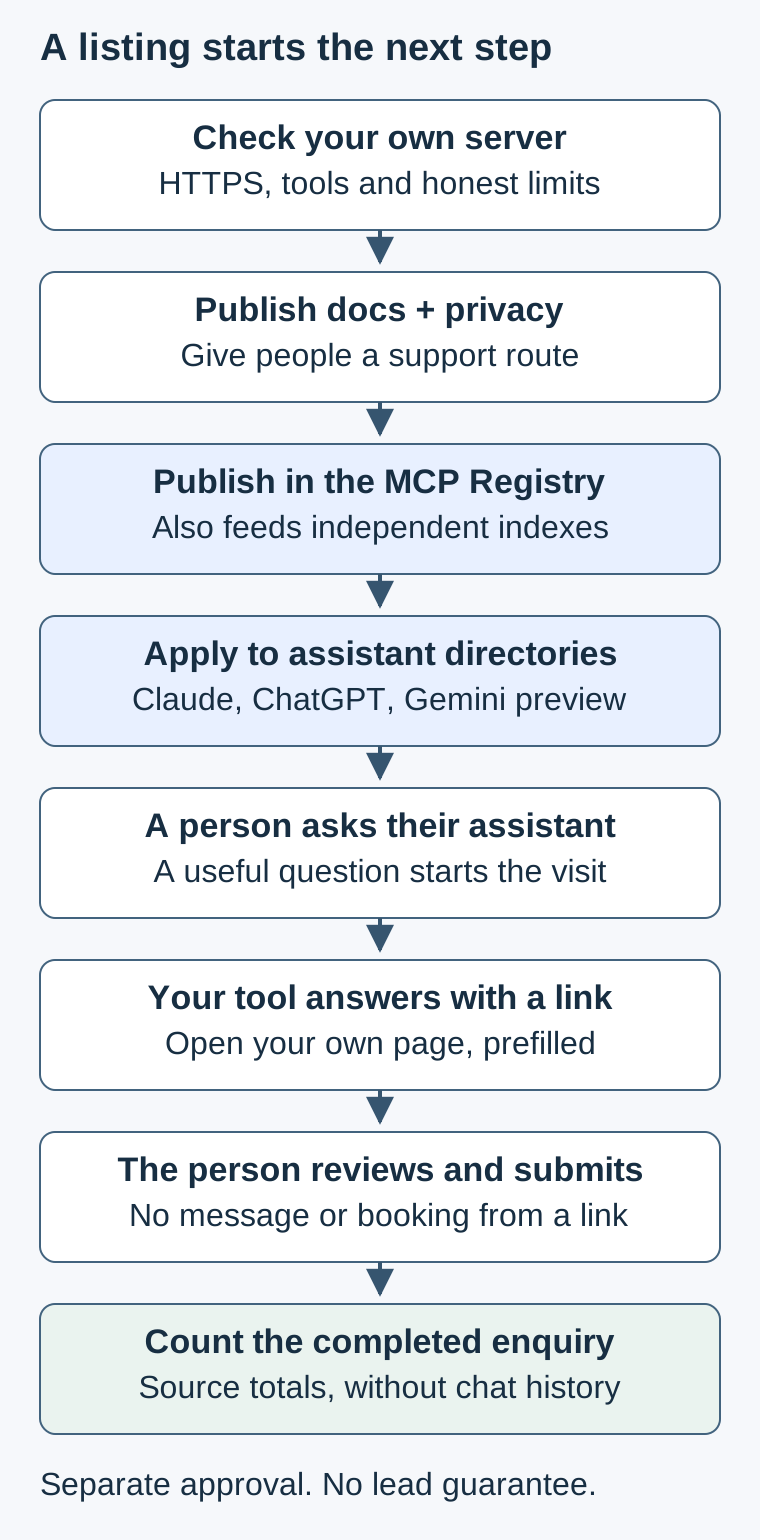
Working server → Public docs + privacy
                         ▼
                    Registry
             ├→ Independent indexes
             ▼
Assistant directories: Claude, ChatGPT, Gemini preview
             ▼
Person asks → Tool answers with your page link
             ▼
Person reviews and submits → You count it
Step 1: publish the official MCP Registry record
Who: developer, with the domain owner's help. The Registry stores metadata, meaning information describing your service. It checks namespace ownership and delegates security scanning elsewhere. Its current documentation still calls it a preview. Publication is no security review and does not automatically admit you to every assistant.
- Prepare server.json, the structured listing file. Include the name, description, version and remote endpoint; add a readable title and documentation URL. For a hosted service, follow the remote-server guide, using
streamable-http, the supported web connection method. The package-based quickstart's npm steps are unnecessary for a remote-only entry. - Choose a namespace, the ownership prefix. A reverse-domain name turns
example.comintocom.example, giving an entry such ascom.example/customer-info. - Prove control using the authentication instructions. DNS is the domain's public address book; a TXT record adds a text proof there. Alternatively, HTTP proof serves the required public-key line at
/.well-known/mcp-registry-auth. Publish only the public proof and protect the signing key. - Use the official mcp-publisher, its publishing command-line program, to validate, authenticate and publish. Follow the current quickstart and installed help rather than copying old installation commands.
- Read your own published record through the API, a software-readable interface. Check name, endpoint, version,
statusandisLatest.
This original read-only example uses curl, a command-line web reader. Replace the example entry with your namespace and server name; %2F represents the slash between them. It reads the Registry, without contacting the listed server:
curl -fsS 'https://registry.modelcontextprotocol.io/v0.1/servers/com.example%2Fcustomer-info/versions/latest'
We used that address pattern for the six records above. Updating requires a new unique version: published metadata is immutable, meaning an existing version cannot be overwritten. Follow the versioning guide. DNS proof may take several minutes to appear according to the authentication guide; that is separate from downstream import timing.
Done when: the public API returns your intended active/latest entry. Record the version and observation time in the tracker.
Step 2: check independent indexes and scanners
Who: owner checks the public entry; developer investigates technical findings. These routes were re-read today. A claim badge can establish who controls an entry; a health check reports what was tested. Neither proves customer outcomes.
Glama
- Publish the Registry record and search Glama, which documents Registry ingestion. Alternatively, use its GitHub submission or hosted-endpoint route.
- Claim the entry using the offered endpoint, domain or GitHub proof. For authenticated checks, configure a dedicated test profile with only needed permissions.
- Compare name, URL, tools and sign-in information, then use the claimed-owner analytics and management options.
Registry changes normally replace linked name, description and URL fields. A claimed owner can choose Glama's listing details as the source of truth. Its FAQ explains proof and updates; its methodology distinguishes metadata health checks from actual tool use. Done when: your entry and ownership state match the intended service.
mcptry
- Publish to the Registry; mcptry says imported listings usually appear within about 30 minutes.
- Find yours and inspect the tool text and health report. Claim it if you want the free maintainer identity badge.
- A hosted server outside the Registry can use its direct GitHub-sign-in submission route. Later Registry publication at the same URL replaces that direct entry.
Update the Registry first, then confirm the import. The methodology says scheduled checks do not execute tools and ranking is not for sale; its interactive playground is a different activity. Done when: the current endpoint and metadata appear, with any findings understood.
PulseMCP
- Read its submission notice.
- While intake is paused, publish accurate Registry metadata and mark this destination paused in your tracker.
- Watch for reopening, then check whether your entry appears.
The notice, confirmed at 18:44:05 UTC, pauses new submissions and existing-listing changes. It says Registry entries will be picked up after reopening and gives no reopening date. This confirms the November 6 guide's warning. Done when: an actual public entry is correct after intake resumes, not when you have merely prepared it.
mcp.so and MCP Market
For mcp.so: 1. choose Remote Server; 2. supply the required endpoint and name; 3. review the paid submission terms before deciding; 4. inspect the resulting listing. The browser read at 18:44:12 UTC showed immediate paid publication without review and a paid Verified badge. That label does not establish security review. Ownership claiming and editing were undocumented on that page, so resolve corrections before paying.
For MCP Market: 1. choose GitHub repository or Remote MCP; 2. supply the destination and contact email; 3. choose free queue or paid placement; 4. verify the entry after notification. The page advertises an average four to six weeks for free intake and within 24 hours for paid placement. Those are vendor statements, not our measured waiting times. Its paid Official badge and destination link do not establish assistant approval. The form did not document claiming, editing or owner traffic metrics.
Smithery: check the remaining directory before following old advice
Smithery's current notice says its connection services, accounts, API and command-line services shut down on October 31, 2026; a curated public directory remains. 1. look for your entry; 2. check that it points directly to the vendor's service; 3. seek current submission instructions before planning an addition. We did not establish a current submit or claim route. Old deployment tutorials are unsuitable listing instructions today.
Most pages in this group did not document owner conversion reporting. Use any available analytics for their stated measure and your own completed-enquiry counts for business results.
Step 3: apply to Claude where customers can connect
Who: owner controls the submitting organization and declarations; developer supplies tested behavior. A custom connector is a connection you add yourself without a public directory listing. Test that first. Claude's current publishing guide requires a paid submitting plan and the appropriate account or organization permissions.
- Open directory management, choose Submit new, then MCP connector. Supply the URL or an existing custom connection.
- Review detected tools and authentication. Fix missing titles or effect annotations on the server.
- Complete the description, examples, business details, icon, documentation, privacy, support and reviewer instructions. Choose the permanent slug carefully.
- Have the owner check the declarations against actual behavior, then submit. Follow the portal's status and feedback through publication.
- Open the public listing and repeat owner-controlled customer tests. Save its URL. Our ten-stage walkthrough supplies the form-level detail.
Community means screening without the deeper functional review associated with Verified. Verified includes tool testing but is expressly no security audit or ongoing performance guarantee. There is no application for Verified: escalation is assessed automatically. Capabilities after connection do not become broader merely because a badge changes.
The September 25 plugin announcement introduced the developer portal's plugin path. A plugin bundle packages reusable instructions and other components in a public GitHub repository, a shared project folder with change history. If it references your own remote server, the current publishing guide says to submit the connector too; paired listings use the same organization and endpoint.
Claude Marketplace is broader. The September 23 introduction covers connectors/plugins, Claude-powered products and service partners; the November 4 update concerns additional agents and products. Listing a connector does not automatically enter an enterprise purchasing program. There is no extra Marketplace application for that ordinary connector listing.
The June 8 observability article introduced developer performance reporting. Current listing management docs describe tool usage and errors, computed daily with up to 24 hours of delay and low-volume suppression. The maintenance guide says plugin usage can initially show sample Preview numbers. Empty charts and sample charts cannot establish leads.
Done when: the public listing, connection and documentation agree. For updates, distinguish server tool changes from reviewed listing edits and plugin-package changes using the maintenance guide. No fixed review time is promised.
Step 4: test in ChatGPT, then consider public Plugins
The signed-in directory we observed today calls itself Plugins: /apps redirects to /plugins, with Public and Personal tabs and a Small Business section. That observation is separate from submission eligibility. Current OpenAI documentation describes plugins shared across ChatGPT and Codex.
Who: owner chooses publishing identity; developer prepares the package and tests.
- For a personal test, open Plugins, use the plus button and Add custom MCP server, provide your endpoint, configure authentication and review the warning. Choose Create as a plugin, inspect tools, then test in a new conversation. Account and workspace policies apply. This follows the connection guide; personal setup does not publish to the public directory.
- For public distribution, complete individual or business identity verification and obtain submission permissions in the owning organization. Prepare the plugin ZIP, including its remote MCP connection, using the submission guide.
- Upload, resolve required checks and connect the server. Complete domain verification by serving the exact plain-text challenge token at the portal's requested
/.well-known/openai-apps-challengeaddress. Do not replace another plugin's token casually. - Set explicit
readOnlyHint,destructiveHintandopenWorldHintvalues for every tool. The last describes interaction with public or open-ended entities. Review the actual definitions against the plugin guidelines. - Prepare five positive tests and three negative tests, an accessible video walkthrough, release notes and HTTPS website, support, privacy and terms links. A negative test shows correct refusal, clarification or limits. Where sign-in is needed, provide a dedicated sample account that reviewers can use without email codes, magic links or interactive approval.
- Submit, address feedback, then publish the approved plugin. Verify its public entry and customer task. These preparation and review requirements are in the submission instructions.
OAuth is an authorization process that lets a person approve account access without giving the assistant their service password. Public-data tools can have no sign-in; private records need appropriate authorization. Do not disguise a protected endpoint as unauthenticated to complete setup.
Today's guide documents daily scans of published remote tools: eligible changes go live after checks pass, with an immediate Rescan option. Metadata and skills changes still need a new ZIP. Keep old approved tool schemas working while an update is held. This is more precise than treating every server edit as a new application. No full review-duration promise was established; the error reference mentions up to two hours for bundled-skill scans, which is a different stage.
Done when: public publication and the intended task both work. Check eligibility first: current rules restrict commerce to physical goods and prohibit certain sensitive inputs. A working lodging connector does not establish that its booking flow qualifies for OpenAI publication.
Step 5: separate Gemini testing from Google publication
Who: owner accepts account and program terms; developer checks tools.
For a custom test: 1. open Gemini's Settings > Gemini Apps Developer Mode; 2. choose Create new and enter your HTTPS endpoint; 3. review the consent screen and connect; 4. inspect Available actions, try prompts and check the Event Log; 5. sync schemas after changes. Google's Developer Mode instructions distinguish connection setup from evidence that a tool actually ran.
For distribution: 1. apply to the Connected Apps preview; 2. once admitted, create the app and supply public details; 3. host its verification JSON at /.well-known/google-connected-apps; 4. configure authentication and sync tools; 5. add testers and resolve issues; 6. send for review, then publish when ready. Google's challenge format differs from OpenAI's plain text. Its publication instructions allow no-auth services and document up to ten minutes for tester visibility, not a review deadline.
Done when: the relevant supported product exposes the published version and the owner verifies the task. Preview admission is separate from a personal test. Tool changes require a new version snapshot through testing, review and publication. The console offers usage analysis; these pages did not establish an owner lead-conversion report.
Step 6: use developer catalogs when that is your audience
Who: developer prepares technical submissions; owner chooses which audiences justify maintenance.
GitHub and VS Code. 1. publish Registry metadata; 2. search GitHub's MCP Registry; 3. if absent, follow its onboarding discussion with your Registry identity and technical details; 4. confirm actual inclusion. A GitHub collaborator's accepted answer describes manual onboarding, followed by version synchronization. Selection and completion time are not guaranteed. Current VS Code documentation uses Customizations > Browse > GitHub Feed, with @type:mcp search. Adding an unlisted endpoint personally is a separate route, not public gallery admission.
Docker MCP Catalog. 1. read the contribution guide; 2. prepare server.yaml, the server definition, tools.json containing [] for tool discovery, and readme.md with the documentation link; 3. complete the required checks against your own service; 4. open a pull request, a proposed repository change for review, and address feedback; 5. verify the catalog entry. Hosted remote servers need no Dockerfile. Docker documents availability within 24 hours after approval, not a 24-hour review. Update through the repository review route. Image-security claims about Docker-built packages should not be transferred to every hosted service.
Cursor. Its current plugin documentation provides the route: 1. package your MCP configuration with a plugin manifest, its package description file, and a README setup document; 2. host the open-source plugin in a public repository; 3. submit that repository for marketplace review; 4. check the published installation and later reviewed updates. This does not require every remote service's implementation to be public. We did not verify the separate community directory's submission form.
LobeHub. Follow its current publishing instructions: 1. prepare an account and repository permissions; 2. complete human login and GitHub connection; 3. claim an existing matching entry if needed; 4. review the listing manifest and hosted endpoint; 5. publish or update with the documented CLI; 6. confirm the public record. The CLI is a terminal program; we did not install or execute it. Old plugin submit advice differs from today's plugin publish and plugin update instructions. Publication creates the record while repository details finish processing.
Microsoft. A private Copilot Studio connection adds your server to an agent. The separate MCP certification preview, updated November 2, offers a public route: 1. verify the publisher business and program enrollment; 2. prepare owned-endpoint evidence, package, authentication including current Azure Key Vault requirements, docs and tests; 3. submit intake; 4. complete Microsoft's review if selected; 5. verify publication and maintain updates. Preview capacity is limited. The Windows on-device registry discovers services on a device; it is not another public customer-acquisition directory.
Done when: the intended audience can find the actual entry. Record absent analytics as unknown. Do not turn a submitted request or private connection into a public-listing claim.
Eleven real examples worth learning from
These are listing and documentation observations, not endorsements or tests of third-party servers. They include small firms, larger providers and a public program. The lesson after each description is our interpretation.
- Church Website Checker, NewCulture Consulting. Its ChatGPT listing offers a public-site check without an account or email gate. Copy the useful diagnostic before asking for contact. Its published-content and Ad Grant limits matter; a potential consultancy lead source is not demonstrated conversion evidence.
- Community Funding NZ, All Too Human. Free funder information without sign-in gives a small firm a specific audience. Copy geographic focus and useful eligibility detail. Confirm deadlines at original funders. Its docs also describe feedback submissions for human review, so the whole connector should not be labeled read-only.
- Checkback. A narrow restaurant-review reply helper is easy to explain. The listed hosting-provider subdomain can make the responsible brand harder to recognize; that is a trust consideration, not evidence of unsafe behavior. Have a person review and post the draft.
- Events for Organisers and public Events discovery, Events.mt. Separate attendee discovery from signed-in organizer work. The trade-off is maintaining clear descriptions and permissions for both surfaces.
- Upfirst. Its signed-in receptionist tools describe recognizable call, text and scheduling tasks. Copy concrete task wording; explain communication permissions before people connect. Do not treat the listing as permission to send on a customer's behalf.
- DirectBooker. Its documented tools return information and links to the hotel's own booking page, carrying trip details rather than making bookings. Copy the human handoff. Its documentation says it logs clicks on booking links so hotels can credit the referral, and a logged click is different from a completed reservation. Studying the pattern does not authorize reuse of its data.
- Planning Center. Each person's account permissions determine what they can access. Copy that explicit boundary. Private church records need sign-in even when that adds friction; some listed tools can create records.
- Givebutter. Its docs describe read-only access to one selected account's nonprofit records and the ability to disconnect. Copy the clear scope and exit route. This serves staff with private data rather than anonymous public discovery.
- Candid. Nonprofit and funder research has a clear information purpose. Copy task-led descriptions, but explain the sign-in requirement before promising an immediate answer.
- Maryland Community Compass. Public funding and planning information is read-only and needs no sign-in, with a US-network restriction. Copy named sources and geographic limits. A public program's usage does not establish a small firm's lead results.
- Benefits Check, Pair Team. The listing states that names, street addresses, birth dates and ID numbers are unnecessary, and screening inputs stay out of logs and monitoring. Copy specific minimization statements only after verifying your own implementation. These are publisher claims; agencies still decide eligibility.
Turn useful answers into enquiries without harvesting data
Our own six documentation pages illustrate different boundaries. TF Rooms returns availability and quotes; its separate email-code booking flow holds a room only after proof, awaiting staff confirmation. SJ Storage returns availability with its checked time and holds no unit. Jerome Handy Wash builds a prefilled contact link and sends nothing. TF Handy Wash answers from published facts and explains how to report a machine problem without filing it. jwatte finds a tool and builds its run link. Apprised identifies its analysis as AI-generated and instructs the assistant to disclose that origin when passing answers on.
Those are our implementation observations and public documentation, not proof that every assistant will present the answer correctly. Our listings so far are not evidence of leads yet.
Start with the Jerome pattern: answer the question, then return your own contact or quote page with a service category preselected. The person adds contact details and submits. Avoid free-text personal material in URLs; browser history and hosting logs can retain it. Jerome's existing message-prefill capability makes this caution particularly relevant. Prefer harmless choices such as service type or machine number.
For accommodation or events, return a prefilled booking or reservation link that holds nothing until the person submits. DirectBooker's documentation supplies a separate real example of this handoff. If you need a two-step commitment, distinguish request, verification, hold and staff confirmation as TF Rooms does. See the booking guide for that design; don't copy a transaction flow into a platform whose rules prohibit its inputs.
Keep names, emails and phone numbers out of tool inputs unless needed and disclosed. OpenAI's restricted-data list prohibits payment-card data covered by PCI DSS, protected health information, government identifiers and authentication secrets, including one-time codes. Our email-code booking design is therefore no template for automatic ChatGPT eligibility. A useful free checker must also provide standalone value: OpenAI prohibits plugins whose primary purpose is advertising.
For measurement, choose a non-personal source tag such as ?source=claude, or UTM parameters, which are campaign labels appended to links. Apply a source only when it is known; don't guess the assistant from a generic server call. Add a voluntary “How did you hear about us?” field. Count submitted enquiries and staff-confirmed outcomes separately from page visits and clicks. Source tags can be copied or removed, so attribution is approximate.
Count tool calls in aggregate without storing what people asked. Document retention and provider logs; an application counter does not erase hosting records. Use directory metrics for their actual measure. Claude's daily lag and low-volume suppression explain why a blank dashboard is inconclusive. A review link is another handoff: the customer writes and posts their own review. No connector should send messages or post reviews on someone's behalf as a lead-capture shortcut.
Reach people after the listing
Give the connection a permanent /connect/ page linked from the footer and contact page. Put the Registry record and assistant listing links there. Include the guide in your llms.txt, a plain-text guide to public pages, without promising assistants will read it. Where relevant profile rules allow, link the guide from your Google Business Profile, nonprofit profile, association directory or partner page.
Make a short how-to post or video showing one customer question, the answer's limits and the final human step. Tell existing customers something specific, such as “You can ask Claude about our hours,” after verifying that task. Offer a demonstration to your chamber, conference audience or community group. Mention the guide in your normal newsletter and social posts. If you maintain a public repository, keep its README and documentation consistent.
Choose one audience and one channel initially. A funder finder may belong in a nonprofit association newsletter; a developer tool may fit GitHub documentation. Track the source and completed enquiry instead of treating every new listing as reach.
A practical two to four week work plan
This is our proposed schedule, not a platform approval promise.
- Week one, developer and owner: confirm the server, examples, limits, documentation, privacy and receiving support. Done when: the owner can follow one safe customer task and the developer can explain failures.
- Week one, developer: publish the Registry entry. Done when: active/latest metadata matches the intended release.
- Week two, owner with developer help: check independent imports, claim useful entries and prepare Claude submission. Done when: each tracker row has a correct public entry or an honest pending/paused state.
- Weeks two and three, developer and owner: test ChatGPT personally, assess public-plugin eligibility, and test Gemini Developer Mode. Done when: actual tool results and refusals are recorded; applications are submitted only where requirements fit.
- Weeks three and four, owner: pursue Google preview or other catalogs when customers justify the effort, publish the connection guide and review initial counts. Done when: promotion, support and a monthly measurement owner are assigned, even if review is still pending.
Maintain one tracker for every listing. Update all affected destinations the same day tools change, including authentication, descriptions, privacy and examples. Record delayed imports and reviews until the public text catches up. Keep compatible behavior while an older approved definition remains in use.
Download the listing steps kit
- MCP directory listing steps kit (.md): readiness checks, per-directory cards, listing tracker, copy-ready descriptions and prompts, a measurement sheet and a first-month audience plan.
Where the revenue comes from
Separate documented business models, plausible opportunities and measured results.
Documented paid offerings: Upfirst sells receptionist plans; Planning Center offers free and paid product plans; Givebutter offers an optional paid Plus plan alongside free features. We read these pages at 18:53:25 UTC. Their signed-in connectors can serve existing customers, but sign-in alone does not prove someone pays or that the connector caused a sale.
Documented vendor sales route: Claude's Marketplace introduction and November update describe a route where a vendor applies to list a Claude-powered product, and eligible enterprise customers can put part of their committed Anthropic spend toward it. Those pages were read at 18:42:31 and 18:42:33 UTC. This is a separate vendor route, with no guaranteed acceptance or sales from an MCP listing.
Plausible income path: a useful answer leads to your page, then a person requests a quote or books. In our TF Rooms case, reservations lead to staff confirmation and payment at the property; the connector takes no payment. Church Website Checker's free diagnostic could lead someone to request consultancy help. That is our interpretation of the model, not evidence that its maker earned revenue through the listing. A nonprofit could similarly connect useful public information to its own donation or event page, while measuring completed gifts or ticket purchases separately.
Platform rules still apply. OpenAI's current guidelines, read at 18:43:01 UTC, limit commerce to physical goods and normally require checkout on your own domain; Instant Checkout is limited to selected partners. Moving payment outside the tool does not remove eligibility restrictions or permit a plugin that is primarily advertising.
Measure money actually received: carry the non-personal source tag into your own enquiry record, then reconcile completed sales privately. Report monthly received revenue less refunds by source, alongside unknown-source revenue, conversion counts and maintenance costs. Keep customer identities and payment details in your normal protected business system. A click, quote, pending reservation or paid-software account is not proof of new revenue.
No evidence yet: we found no connector-attributed revenue figures for any business named here, and in our case listing-attributed income remains unestablished. A listing with no useful next step supplies no demonstrated earning path.
For the wider small-business launch decisions, The $97 Launch is the related book. The useful next action is to fill in the kit's owner, task and human-handoff fields before opening an application form.
Related reading
- Projects built with Claude Code and Codex: what to borrow
- Build an MCP connector for nonprofits, events and WordPress
- The November 6 connector submission walkthrough
- MCP servers for small business
- Connector permissions for small business
- AI projects on Devpost that made real money, and the ones that only won prizes
- How DoorDash, Amazon and Starbucks use AI agents, and what a small shop can copy
- Design, search and AI readiness for a site launch
Fact-check notes and sources
All read dates below are November 7, 2026, UTC. Source links appear beside the claims. We read public documentation and used signed-in browser observations where needed. No third-party server was connected, no application was submitted, and no lead results were measured. Approximate platform timings are attributed statements. No directory prices are reproduced.
- Our servers: documentation linked in Step 0 read at 18:42:58 to 18:43:04; initialization and tool inventories at 18:43:31 to 18:43:33; the six linked Registry API records at 18:43:34 to 18:43:41. The earlier check was 18:23:47 with Registry confirmation at 18:24. Mail delivery and transaction behavior were not retested.
- Registry: quickstart, authentication, remote-server, FAQ and versioning pages at 18:42:58 to 18:43:04; scope and security at 18:44:30. MCP-Sentinel's license API at 18:43:04 and README at 18:43:06; SPDX identifier MIT.
- Claude: publishing, verification and maintenance documentation at 18:42:25 to 18:43:03; the four dated announcements at 18:42:28 to 18:42:33. The recheck supports the earlier guide's Community/Verified and metrics statements; it adds the broader plugin and Marketplace distinctions without claiming those changed overnight.
- OpenAI: submission, error reference, guidelines, review and connection docs at 18:42:58 to 18:43:03. We use current submission instructions for automatic tool updates where older snapshot-oriented explanations differ.
- Google: Connected Apps overview at 18:42:34; Developer Mode, publication and prerequisites at 18:43:04 to 18:43:07. Preview eligibility and review completion remain separate from testing.
- Independent and developer catalogs: linked first-party pages at 18:42:24 to 18:44:17; PulseMCP browser confirmation at 18:44:05 and mcp.so at 18:44:12. GitHub's onboarding source is an attributed collaborator answer, not a promised self-service process. Unverified community-directory submission details were omitted.
- Business examples: Claude and ChatGPT browser listings were read within the verified 18:25 to 18:41 window; exact per-page times were not recorded for that first pass. Browser rechecks supplied exact listing times from 18:46:19 to 18:48:51, including the two linked ChatGPT detail pages. Six public Claude Marketplace pages were independently read at 18:43:55 to 18:44:07. DirectBooker, Planning Center, Givebutter and Maryland documentation was read at 18:44:39; Community Funding NZ documentation at 18:44:50. Listing data-handling claims were not code audits. Public badges on different surfaces were not treated as proof of a status change.
- Revenue models: Upfirst, Planning Center and Givebutter pricing pages linked above were read at 18:53:25. Paid offerings are documented; no amounts, customer totals or connector-attributed revenue are claimed.
This post is informational, not legal advice. Mentions of third parties are nominative fair use. No affiliation or endorsement is implied.
