

GitHub's MCP Registry, the list VS Code and GitHub Copilot install from, held 771 servers when we counted on November 8, 2026: about 1.3% of the 58,585 in the official MCP Registry. It is not a big-brand showcase. Microsoft's and GitHub's own servers are 19 of the 771, the median linked repository has two GitHub stars, and 647 different publisher names appear. Three in four can be used as a hosted (remote) server, and more than half of the records were created in October 2026. GitHub staff say onboarding is done by hand and have not published how they choose. What the listed servers share is plain documentation: two thirds have an install section, about half list their tools, and three in four show a configuration example. This week, publish an accurate official Registry record, make your README say what the server does, how to install it and which tools it has, then ask GitHub to onboard it. Our count and the staff explanation were read on November 8, 2026; exact times appear below.
The question was what Microsoft picked. There are two different answers. GitHub's developer catalog and Microsoft's separate certification program have different submission routes. Completing one does not complete the other. Treating both as a single approval system leads to unnecessary work and claims the evidence cannot support.
This article is dated November 7 for the publishing schedule. The measurements and submission follow-up below are from November 8 UTC. The catalog size can change after this snapshot.
First, understand what you are listing
MCP means Model Context Protocol, a shared way for an assistant to use an outside service. An MCP server supplies named functions called tools: for example, find a documentation page or retrieve an order's status. A connector is the connection from the assistant to that server. The client is the application making the connection, such as VS Code. A plugin can bundle that connection with instructions or other capabilities; its meaning depends on the client. GitHub's MCP overview explains the connection model.
A registry is a machine-readable catalog, much like a stock list with product identifiers and delivery details. A gallery or directory adds a browsing and installation experience. The official MCP Registry records publishers' server metadata. GitHub curates a separate catalog that developer applications can use. A record in the first does not establish inclusion in the second, according to the current staff clarification.
A README is the project's front-door documentation. A repository is the collection of source files and project history. A package is software the user downloads and runs. A remote server runs at the provider, reached through an endpoint, its connection address. A transport is the communication method: Streamable HTTP uses web requests; standard input/output, usually written stdio, connects a client to a local process. These choices have different setup and permission consequences, covered in VS Code's connection guide.
Who: the owner chooses the audience; the developer chooses the delivery method. Done when: both can finish this sentence: “Our server helps [person] do [task], using [information], with [permission].” We use that as a planning test; directory requirements are documented separately.
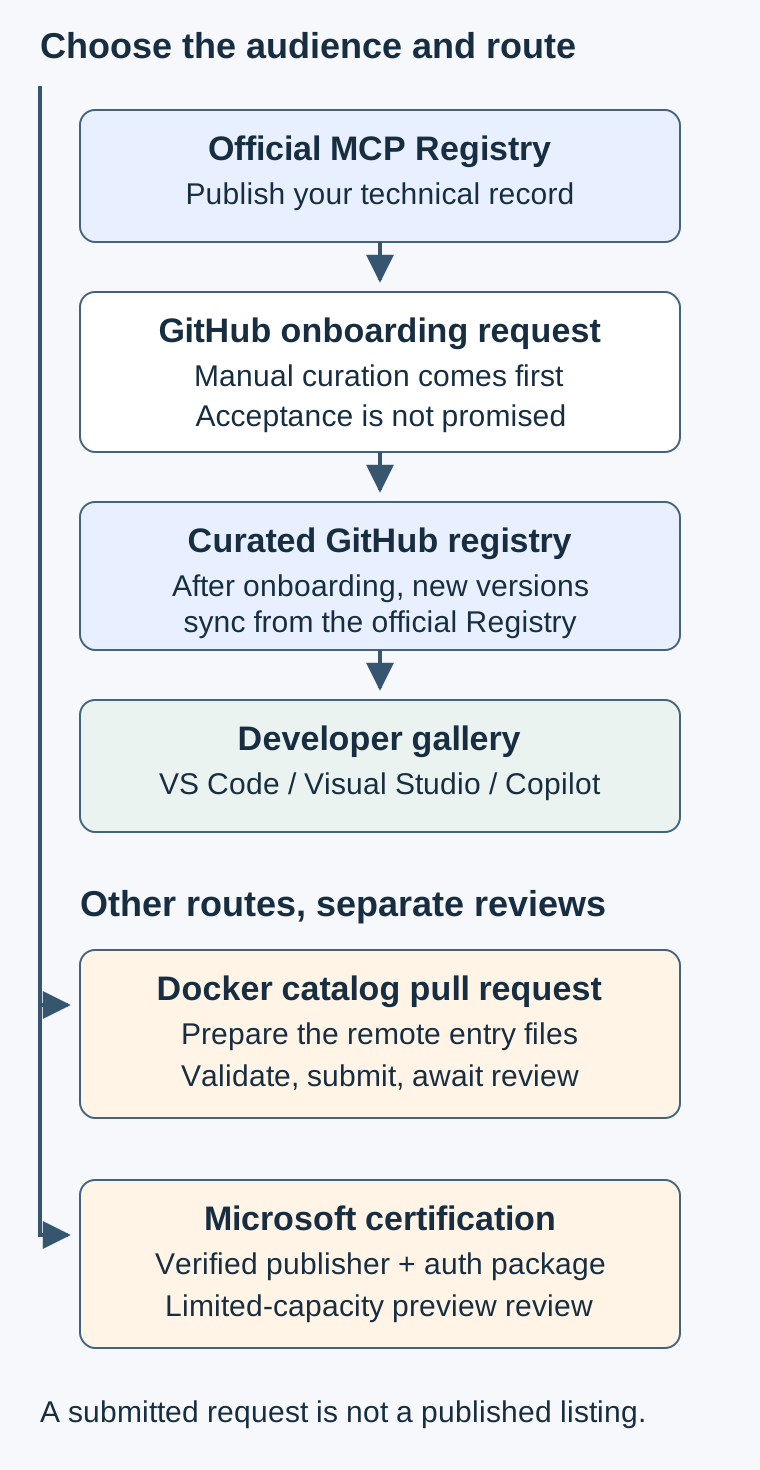
Text version:
Working server and public documentation
  ├→ Official MCP Registry
  │    ▼
  │  GitHub onboarding request
  │    ▼ if selected
  │  Curated GitHub MCP Registry
  │    ▼
  │  VS Code / Visual Studio / Copilot gallery
  ├→ Docker catalog pull request → separate review
  └→ Microsoft certification → separate review
What we counted, and what the numbers mean
An API is an interface software uses to request information or actions. We read all eight pages of the GitHub catalog API, following its returned cursor until it ended: 771 entries and 771 distinct names, between 03:06:31 and 03:06:45 UTC on November 8. We read catalog metadata, embedded READMEs and public repository metadata. We did not connect to any listed server, discover its tools or test its behavior.
We also completed all 586 pages of the official Registry's latest-version feed, from 03:06:31 to 03:20:55 UTC. It returned 58,585 distinct names, every record marked latest: 57,647 active and 938 deprecated. GitHub shares 742 exact names, representing 1.27% of all latest official records, or 1.29% of active records. All those exact matches were active.
For comparison, dividing the whole GitHub catalog, 771, by 58,585 gives 1.32%. That catalog-size ratio includes 29 GitHub names without an exact official match. Some naming differences may reflect older identifiers; we did not assume equivalence. Neither calculation establishes an acceptance rate. Pagination takes time and does not freeze the registries, so these totals describe the completed observation window.
Unless a table says otherwise, its denominator is all 771 GitHub entries, including missing fields. Percentages are rounded to two decimal places. The API snapshot is the source for the following owner, delivery, date, README and description tables. We calculated these statistics from the returned records.
Publishers: many small namespaces, few Microsoft entries
A namespace is the ownership prefix before the slash in a registry name. We grouped that prefix, lowercased it, and removed an initial io.github.. We did not merge unrelated domain names or assume a namespace represents one legal company. This produces 647 owner labels. Here are the top 25, ordered by count, then alphabetically for ties. The cut falls inside a tie: 15 owners have two entries, and the table shows the first 10 of them alphabetically.
Scroll to compare columns and rows when the table extends beyond the box.
| Measure | Count | Share |
|---|---|---|
| com.hasdata | 25 | 3.24% |
| ai.saifs | 17 | 2.20% |
| flashdata-dev | 15 | 1.95% |
| com.1102tools | 9 | 1.17% |
| antohins | 8 | 1.04% |
| com.avalara | 8 | 1.04% |
| microsoft | 8 | 1.04% |
| com.microsoft | 7 | 0.91% |
| mechubsec | 6 | 0.78% |
| akzar1el | 5 | 0.65% |
| ch.antevo | 4 | 0.52% |
| cyan-eclipse-technologies-llc | 3 | 0.39% |
| io.imagekit | 3 | 0.39% |
| jdhart81 | 3 | 0.39% |
| smaniches | 3 | 0.39% |
| ai.ciphyr.agentmart | 2 | 0.26% |
| chrisryugj | 2 | 0.26% |
| co.lumman | 2 | 0.26% |
| com.corenexis | 2 | 0.26% |
| com.docspring | 2 | 0.26% |
| com.offlineprotocol | 2 | 0.26% |
| com.smartbear | 2 | 0.26% |
| helena-bioinformatics | 2 | 0.26% |
| igniteui | 2 | 0.26% |
| mapbox | 2 | 0.26% |
Our Microsoft/GitHub group contains 19 entries, 2.46%. The normalized owner labels counted were microsoft, com.microsoft, azure, github, microsoftdocs and azure-ai-foundry; the first and fourth include io.github.microsoft and io.github.github. Repository and README identity support the additional documentation and Foundry labels. This identified publisher group has limits: we did not investigate every corporate affiliation. Software that connects to Azure or Microsoft 365 was not counted merely for mentioning those products. Catalog records.
Delivery: hosted services are common, and some offer both
Scroll to compare columns and rows when the table extends beyond the box.
| Measure | Count | Share |
|---|---|---|
| Remote available | 585 | 75.88% |
| Local package available | 314 | 40.73% |
| Both available | 128 | 16.60% |
| Remote only | 457 | 59.27% |
| Local only | 186 | 24.12% |
The first two rows overlap. There are 393 package records across the 314 package-bearing entries. Every package record has an empty registry_name field, 393 of 393, 100.00%, so that field cannot support an ecosystem market-share claim. Runtime hints identify some launchers: uvx, commonly used for Python packages, appears 71 times (18.07% of package records); npx, for JavaScript packages, 44 (11.20%); docker 22 (5.60%). The hints uv, node, imagesorcery-mcp and memo-mcp each occur once (0.25%); 252 are unstated (64.12%). No record explicitly states dnx. Missing hints do not mean those runtimes are unsupported. Package metadata.
A supplemental exact-name join to the official Registry provides stated package ecosystems for 296 of the 742 matched entries. With all 771 GitHub listings as the denominator, ecosystem presence is npm 189 (24.51%), PyPI 91 (11.80%), OCI container images 37 (4.80%), MCPB bundles 29 (3.76%), NuGet 8 (1.04%), and Cargo 1 (0.13%). These are official-record metadata, with overlapping categories where a server offers multiple package types. The join matches names; the official latest version can differ from the version in GitHub's snapshot. They do not fill GitHub's blank fields by guesswork.
Among 618 remote records, Streamable HTTP appears in 598 (96.76%) and Server-Sent Events, an older event-stream transport, in 20 (3.24%). Multiple addresses can belong to one entry. We counted stated transport values rather than inferring connectivity. The official remote guide recommends Streamable HTTP for new hosted listings.
When the records were created
These are the API's created_at months. They do not establish project founding dates or acceptance dates. Importing a record can produce a date different from the server's launch. October accounts for 401 records, 52.01%, but that does not prove a change in selection policy. Record dates.
Scroll to compare columns and rows when the table extends beyond the box.
| Measure | Count | Share |
|---|---|---|
| 2025-12 | 53 | 6.87% |
| 2026-01 | 19 | 2.46% |
| 2026-02 | 8 | 1.04% |
| 2026-03 | 11 | 1.43% |
| 2026-04 | 4 | 0.52% |
| 2026-05 | 2 | 0.26% |
| 2026-06 | 29 | 3.76% |
| 2026-07 | 62 | 8.04% |
| 2026-08 | 60 | 7.78% |
| 2026-09 | 90 | 11.67% |
| 2026-10 | 401 | 52.01% |
| 2026-11 | 32 | 4.15% |
What the READMEs contain
The API supplied nonempty README text for 768 entries, 99.61%. We applied simple text heuristics to that text, with all 771 entries as the denominator. Each listing counts once, including listings that share the same repository README. JSON is a structured text format for settings and data. A missing match is not proof the documentation lacks the topic, and a matched heading does not prove the instructions work. Embedded README source.
Scroll to compare columns and rows when the table extends beyond the box.
| Measure | Count | Share |
|---|---|---|
| Installation/setup section | 515 | 66.80% |
| VS Code or Visual Studio install link | 113 | 14.66% |
| Tool-list section | 408 | 52.92% |
| Authentication section | 202 | 26.20% |
| Security/privacy/safety section | 242 | 31.39% |
| License mention | 535 | 69.39% |
| Example-prompt wording | 262 | 33.98% |
| Configuration-like JSON block | 569 | 73.80% |
For sections, the heuristic looked for Markdown headings with words such as install, setup, available tools, authentication, credentials, security or privacy. Install links matched known editor link schemes or installation addresses. License counted the word license/licence or SPDX, the standard license-identifier label. Prompt detection looked for phrases such as example prompts or try asking. Configuration detection looked for a fenced JSON-like block containing mcpServers, servers, command or url. HTML headings, unusual wording and linked documentation can be missed. General-purpose repositories can also match without documenting their MCP component specifically.
Our grouping by description
This is our grouping, not GitHub's taxonomy. DevOps covers building and operating software; AI/ML means artificial intelligence and machine learning. We removed generic MCP-server and AI-assistant wording, then applied description keywords in this priority order: security; browser/testing; data; cloud; development; documentation/search; AI/ML; business; otherwise other. A first match wins, so every entry has one category. For example, database terms take priority over a later mention of search. This deliberately simple rule describes the text; a server may have further capabilities. Descriptions.
Scroll to compare columns and rows when the table extends beyond the box.
| Our category | Entries | Share |
|---|---|---|
| productivity and business apps | 141 | 18.29% |
| documentation and search | 140 | 18.16% |
| databases and data | 133 | 17.25% |
| developer tools | 98 | 12.71% |
| AI and ML | 89 | 11.54% |
| cloud and DevOps | 72 | 9.34% |
| other | 40 | 5.19% |
| security | 36 | 4.67% |
| browser and testing | 22 | 2.85% |
Repository signals, with the missing data left visible
Of 771 entries, 769 (99.74%) linked a GitHub repository. We completed 705 distinct metadata requests: 701 succeeded and four returned no metadata. Successful responses cover 765 of 769 linked entries (99.48%), or 99.22% of the whole catalog. We used numeric repository IDs where provided and repository names otherwise; one supplied ID was a name rather than a number. These are GitHub repository metadata observations from 03:07:05 to 03:26:11 UTC.
After identifying repositories by returned numeric ID, the 701 measured repositories had a median of two stars, with a range from zero to 194,336. Stars are users' bookmarks of interest. They provide no security assessment. The median last-push date was October 29, 2026; the range was May 22, 2025 to November 8, 2026. One repository, 0.14%, was archived. A push records repository activity; it may concern another component in a shared repository rather than the MCP server. None of these signals establishes a GitHub selection threshold.
The API's license identifiers, with 701 measured repositories as denominator:
Scroll to compare columns and rows when the table extends beyond the box.
| Reported SPDX value | Repositories | Share |
|---|---|---|
| MIT | 448 | 63.91% |
| No identifier returned | 99 | 14.12% |
| Apache-2.0 | 79 | 11.27% |
| NOASSERTION | 40 | 5.71% |
| AGPL-3.0 | 14 | 2.00% |
| MIT-0 | 8 | 1.14% |
| CC-BY-4.0 | 6 | 0.86% |
| GPL-3.0 | 3 | 0.43% |
| MPL-2.0 | 2 | 0.29% |
| BSD-3-Clause | 1 | 0.14% |
| PostgreSQL | 1 | 0.14% |
NOASSERTION means no definite SPDX identification was supplied. Missing or unclassified metadata does not establish whether a license file exists. We did not read every license file or assess permission to reuse these projects. These counts should prompt a closer look at a project you intend to use.
Explicit business and consumer uses do exist
A separate manual review of descriptions identified 110 entries, 14.27%, whose description names a use for local businesses or online sellers, shoppers, travelers and lodging, households, job seekers, learners, health, tax and accounting, or pensions. We included sector-specific data services and excluded generic email, calendar, CRM and project management tools, legal research databases, general market and investing data, and general-purpose calculators or media editors. The review started from keyword matches, so it can miss entries. We did not measure how many businesses use the catalog. It overlaps the categories above. Catalog descriptions.
Examples include com.restaurantdoctorai/profit-check, a profit and recipe-costing check for restaurants; com.sellerprofitdoctor/free-tools, a profit check for Etsy, Shopify and Amazon sellers; za.co.wrdo/wrdo for local businesses, menus and price lists in Cape Town; and io.github.brunoreisportela/arrumou-neural for managing vacation rentals. Most of the 110 are platforms, data services or tools built for businesses or consumers; only a few, such as a notary's office's tax calculators (it.notaiochianese/strumenti-di-calcolo), read as one local firm's own server. These are described uses; their results and suitability were not tested. “Almost none” would be inaccurate. The distribution channel is developer-oriented, but the subject matter extends beyond software development.
What GitHub actually says about getting picked
GitHub's launch announcement described a curated directory and a future in which official Registry publication would flow automatically into GitHub. That historical promise explains why publishers expect immediate appearance. The staff answer in discussion 1257 gives the operational distinction: onboarding is manually curated; after onboarding, newly published versions synchronize from the official Registry. Use that clarification when planning a submission.
We did not find published selection criteria in the sources reviewed. There is no supported acceptance formula based on stars, README headings or number of tools. A pattern in accepted listings cannot tell us whether that pattern caused selection. We also lack rejected applications, review notes and a complete history of what the catalog previously contained.
GitHub's later installation tutorial also describes publishing to the official Registry before nomination. Its governance update distinguishes catalog discovery from an organization's allowed-server controls. Read these as different jobs: publication makes a record, curation chooses a gallery entry, and the customer's policy governs use.
GitHub's Copilot guidance recommends enabling only the tools a task needs, preferably read-only tools, and validating the actual configuration. A read-only tool retrieves information without changing records. Those recommendations concern responsible connection use; GitHub does not state them as gallery selection conditions. An organization can also apply its own MCP policy, so public discoverability does not guarantee employees can connect.
VS Code's documentation describes browsing the GitHub Feed through its customization interface, checking the publisher and prerequisites, and reviewing trust and authentication prompts. It distinguishes configuration formats and destinations. A button can make installation convenient while still requiring a person to understand the command or endpoint it adds. Do not paste a setup block from another client without checking its format.
Visual Studio's guide describes its MCP Registries gallery, website installation buttons and configuration files. Trust handling depends on the client's version and settings; tool approval is a separate decision. Our recommendation is to document the clients you actually support and leave their review prompts intact. Gallery inclusion cannot substitute for checking the requested access.
A practical publishing checklist
These are our recommendations drawn from the documented routes and the measured catalog. They are patterns and preparation steps. GitHub has not published its selection criteria.
-
Publish an accurate official Registry record first. A
server.jsonfile is the structured listing record, like a product label for software. A namespace reserves the publisher part of the name. For a business, we suggest a reverse-domain namespace you control, such ascom.example/customer-help; the official Registry also supports GitHub identity. Its authentication guide describes domain verification through DNS or a public web file. A DNS TXT record is a text note in the domain's public address book. The developer handles verification; the owner confirms domain control. Done when the public record shows the intended name, version and endpoint. Domain ownership proves control of the name. The service's safety requires separate evaluation. -
Say what it does and for whom in one line. Our category counts came from descriptions because that is the first useful explanation a reader gets. “Helps shop staff look up published product specifications” is more informative than “AI tools for business.” State meaningful limits too: reading a published price, reserving stock and taking payment are different actions. The Registry quickstart gives the metadata structure; the owner should supply the factual promise. Done when someone unfamiliar with the project can describe its purpose without opening the code.
-
Make the README usable without a meeting. In our text checks, 515 entries (66.80%) matched installation headings, 408 (52.92%) tool-list headings, and 262 (33.98%) example-prompt wording. Include installation for VS Code and other supported clients, a tool list, authentication, security considerations, license or service terms, example prompts and configuration. Explain prerequisites before the install button. Put the expected result beside each example so a reader can recognize success. Our measurements establish that these patterns occur; they do not make every heading mandatory for GitHub. The developer writes the steps and the owner checks that the examples match the intended audience. Done when another person can follow the documentation using their own approved environment.
-
Choose hosted or local delivery for a reason. Our catalog count found 457 remote-only entries (59.27%), 186 local-only (24.12%) and 128 offering both (16.60%). A hosted Streamable HTTP server can suit a service you already operate; a local package can suit work that needs files or tools on the user's machine. Neither automatically has fewer permissions. The official remote-server guide describes the hosted record, while VS Code explains local runtime prerequisites. A runtime is the program that executes a package. The developer should document the exact package or address, supported versions and data boundary. Done when installation instructions agree with the delivery fields in the Registry.
-
Describe tool effects honestly. An annotation is a machine-readable label on a tool.
readOnlyHintdescribes whether it only reads;destructiveHintdescribes destructive potential;idempotentHintdescribes whether repeating the same action adds another effect;openWorldHintconcerns interaction beyond a closed set of entities. The MCP tool specification treats annotations as hints. They cannot enforce permissions or make untrusted code safe. The developer must check behavior against labels and keep the smallest useful set of tools enabled, consistent with GitHub's recommendations. Done when the documented effect and the implemented effect agree, including failure cases. -
Keep versions and listing records together. A version identifies a release so people can tell which instructions apply. Follow the official versioning guide when publishing metadata changes. Keep a release checklist covering the package or endpoint, record, README, tool descriptions and client examples. GitHub's staff clarification supports synchronization after onboarding, but does not establish an immediate deadline. The developer owns this step. Done when the expected version is visible in each catalog you actually use; record an absent or older entry honestly.
-
Prepare identity, icons and support. An icon is the small image a gallery uses to identify the service. Use your own branding, a readable name, public documentation and a monitored support route. Follow the relevant package guidance rather than copying another publisher's artwork. Microsoft's certification page specifically points to Teams package and icon requirements. That does not establish the same requirement for GitHub. The owner supplies accurate identity and support details; the developer checks that the links work. Done when the package and public pages identify the same responsible service.
-
Choose Microsoft certification only when the audience justifies it. OAuth lets a person authorize account access without handing the assistant their account password. Microsoft's current certification preview covers Copilot Studio, Copilot chat, Cowork and Azure Foundry. It adds business verification in Partner Center, enrollment in the Microsoft 365 and Copilot program, control of the endpoint, package files, icons and review. Its documented authentication setup retrieves OAuth configuration from Azure Key Vault, Microsoft's secret-storage service. It says Dynamic Client Registration, automatic creation of client credentials, and PKCE, an authorization-code protection mechanism, are unsupported in this path. A no-sign-in, read-only public service should clarify eligibility before building that machinery solely for a listing. That is our judgment about the effort and audience. Microsoft does not explicitly exclude all unauthenticated servers on this page.
For certification, the same live page says preview processing capacity is limited and the legacy process remains available through November 18, 2026 for immediate publishing timelines or customer commitments. Its package table requires intro.md, while a later heading calls the intro file optional. Prepare the explanation and confirm the current package instructions with the program. Do not turn inconsistent wording into a confident exemption. The owner decides whether the route matters; the developer prepares evidence. Done when actual publication is confirmed, rather than when an intake form is sent.
In our case: two requests, no acceptance claim
Our own public server illustrates the difference between technical preparation and listing. On November 8 we submitted a Docker MCP Catalog pull request and a GitHub onboarding request. The latter identifies com.jwatte/site version 1.1.0, its Streamable HTTP connection, documentation, read-only tools and terms. It says the implementation repository is not public. Those are statements in our request. Eligibility and acceptance remain unconfirmed.
The Docker proposal contains server.yaml, a structured server definition; tools.json, a JSON file containing [] for this remote entry; and readme.md, including a Docs line. The proposed endpoint is https://jwatte.com/mcp, without OAuth. Docker's contribution guide supplies the submission framework. Dynamic discovery means the catalog obtains the remote tool definitions separately; an empty tools file here does not mean our service offers no tools.
In our earlier validation, the title needed every word capitalized: “jwatte.com website tools” became “Jwatte.com Website Tools.” Formatting also mattered. The validator invokes Prettier for the YAML, so its environment needs Node as well as Go. Our plain Go container produced an empty failure message before that dependency was available. The remote-server license check was skipped. Passing those checks did not grant a license, complete a security assessment or obtain catalog approval. The kit separates our observed failure messages from the checks visible in Docker's validator source. We did not rerun the validator for this article.
At our final read on November 8, 2026, 03:25:45 UTC, the Docker PR remained open and unmerged. At 03:25:47 UTC, our GitHub request had no replies. The older discussion itself was closed and marked answered; that thread-level state says nothing about acceptance of our later request. Neither listing was accepted in the evidence we saw, and we have no listing-attributed traffic to report.
Should a small business spend time on this?
Use the GitHub gallery when developers are a useful audience for your service: developer tools, a software service with an API, or agency work that connects existing systems. A service may help a shop while still requiring a developer to install and maintain it. Audience and installation complexity are separate questions.
For local customer discovery, start with the assistants customers already use. Our existing guides cover the Claude directory, ChatGPT plugins and Gemini publication routes, and Meta Muse. Those routes deserve an audience check too. No catalog establishes that customers will find the entry, connect it or buy anything.
An agency or web person can make a narrow developer-facing server around an existing service, document its installation, and show how it helps someone building a site or internal workflow. Start with one repeated task and a public demonstration that uses no customer records. Measure useful connections and completed customer enquiries separately. If the tool returns a contact-page link, the assistant may prefill permitted fields; the person reviews and sends. A listing creates an ongoing distribution experiment; any revenue result needs its own evidence.
Use the kit before applying
- GitHub and Docker MCP catalog kit (.md): official Registry readiness, a developer README outline, onboarding fields, a remote Docker entry worksheet, validation lessons and Microsoft certification decisions.
The owner can fill in audience, ownership, support and limits. The developer can complete the technical fields and checks. Keep submission status separate from the preparation checklist: draft, submitted, changes requested and published each mean something different.
For the agency side of deciding what to build and maintain, The $20 Dollar Agency is the related book. Fill in the kit's audience sentence before adding another catalog to the maintenance list.
Related reading
- Where to list your MCP connector in 2026
- What getting a connector listed takes
- Build an MCP connector for nonprofits, events and WordPress
- MCP servers for small business
- Connector permissions for small business
- Meta Muse and website compatibility
- Design, search and AI readiness for a site launch
Fact-check notes and sources
All reads below were on November 8, 2026 UTC. We used public documentation and catalog/repository metadata. The counts describe this snapshot. Category and audience assignments are ours; README matches are text heuristics. We did not run third-party projects, call their MCP tools, audit their code or measure customer traffic. Repository license identifiers are metadata. Read the actual license before deciding whether code can be reused. No prices are quoted.
- Catalog data: GitHub API, all eight pages, 03:06:31 to 03:06:45; official Registry latest-entry API, all 586 pages, 03:06:31 to 03:20:55. Repository metadata: 03:07:05 to 03:26:11, using GitHub's repository metadata API, whose documentation was read at 03:13:47. No project source was reused.
- GitHub policy and clients: MCP concepts, 03:07:07; Copilot setup, 03:07:08; launch announcement, 03:07:07; later tutorial, 03:07:09; governance update, 03:07:11. The staff clarification was read at 03:06:12. Community requests in that thread are not selection policy.
- Editors: VS Code connections and Visual Studio, 03:07:07; VS Code configuration, 03:08:19, and trust handling, 03:08:21. Installation was not tested here.
- Official publishing: quickstart, 03:08:02; authentication, 03:08:04; remote servers, 03:08:01; versioning, 03:08:00; schema, 03:08:35; tool annotations, 03:08:05.
- Separate review routes: Microsoft certification, 03:07:08; Docker contribution guide, 03:07:09; validator source, 03:07:10. The empty-message container failure is our earlier experience; we did not reproduce it for this article. The kit's JSON and YAML examples were parsed; the Registry example was schema-checked. These checks do not establish runtime compatibility.
- Our requests: Docker PR initially read at 03:06:12; GitHub request at 03:06:42; final status check 03:25:45 for Docker and 03:25:47 for GitHub. Neither listing was accepted at that check.
This post is informational, not legal advice. Mentions of third parties are nominative fair use. No affiliation or endorsement is implied.
